nexus¶
A utility for running multiple Claude Code instances in parallel and managing them as a team — spawning new workers for specific tasks, observing their state through tmux and GitHub, routing follow-ups, and cleaning up when each one finishes.
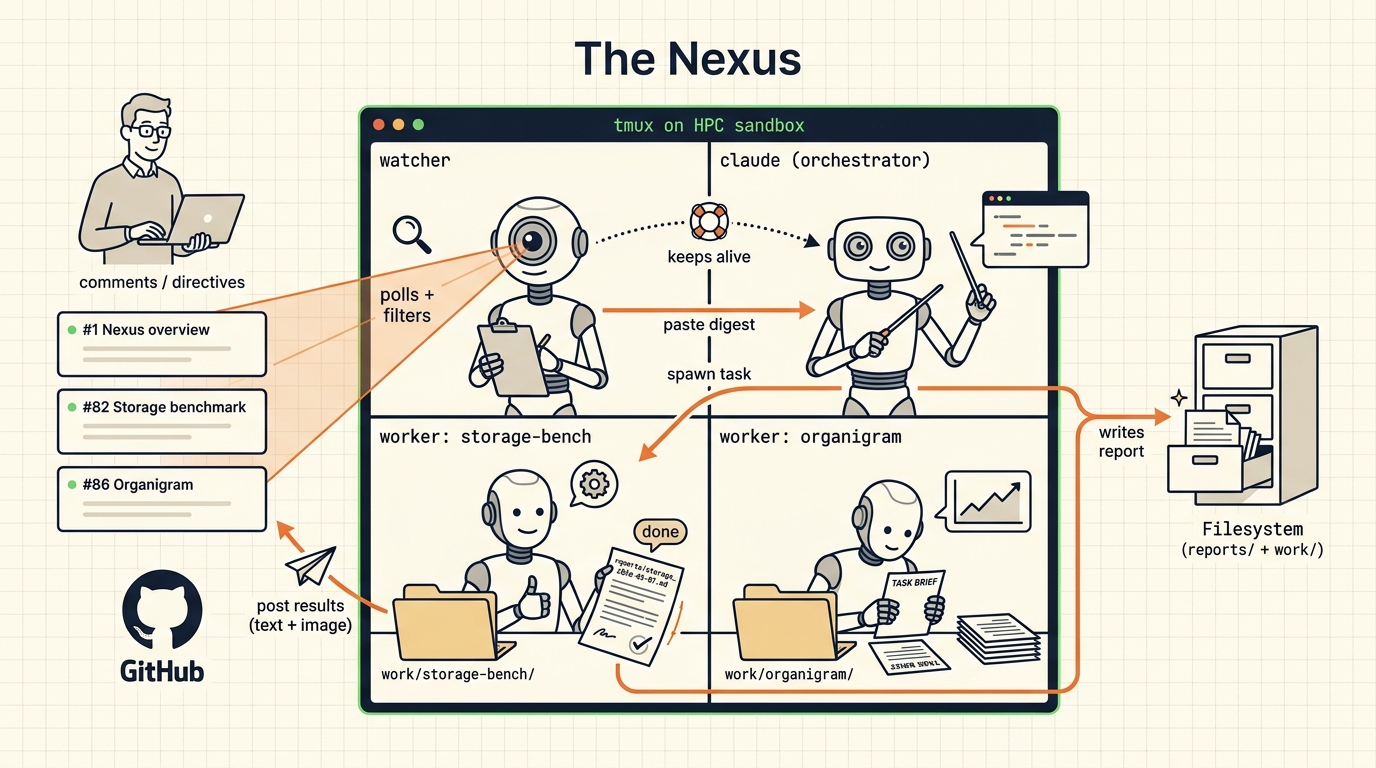
Three things nexus is designed to give you:
- Minimal distraction for workers. A worker sees its task, the safety floor, and a brief project preamble — nothing about the broader orchestration. Failures stay contained to a single tmux window and don't propagate to siblings.
- Long, complex, multi-step tasks. Workers can do research, download data, write code, run tests, execute long-running analyses, and produce reports, notebooks, plots, or PDFs — over hours or days. The orchestrator-watcher loop keeps them on track without micromanaging.
- GitHub as the communications hub. Workers and the orchestrator post on GitHub issues and PRs; the operator reads and replies there. No bespoke UI to learn; mobile push notifications fire on every state change.
Containment required
Nexus launches each worker as claude --dangerously-skip-permissions,
so workers can run shell commands without per-action confirmation.
Run nexus only inside agent-sandbox
(recommended), a VM, or another containment layer that constrains
what the worker can read, write, and execute. Do not run on a
development laptop without containment.
Pre-release
nexus-code is under active development. Public surfaces (the ng
CLI, config/nexus.yml schema, watcher emit shapes) are still
settling and may change between versions until the first tagged
release. Treat this site as the source of truth; older READMEs
and inline comments may lag.
Public/private split¶
<your-org>/nexus-code— this repo, soon public. The code: watcher, orchestrator launch prompt,ngCLI, skills, this docs site.- Your asset+issue repo — private, one per operator. The live state: issue threads, dashboard, uploaded reports, embedded images.
The code is shared. The state is yours. Nexus instances are designed for a single operator; team collaboration is informal — operators run their own nexuses and coordinate through GitHub or shared write directories. See Admin → Repos § Collaboration patterns.
Quick start¶
The recommended install is Claude-Code-driven: launch the bootstrap in agent-sandbox and answer its questions.
git clone https://github.com/<your-org>/nexus-code.git && cd nexus-code
agent-sandbox tmux new-session ./monitor/bootstrap-install.sh
# Claude Code walks you through asset-repo creation, the GitHub App,
# the webhook, config/nexus.yml, and the smoke tests. When done:
agent-sandbox tmux new-session ./watcher
The detailed path — including a fully manual fallback — is Install. The first session, what you see in tmux, what appears on GitHub, is First run.
Where to go from here¶
- Getting started — what nexus is, who it's for, the prerequisites, install, your first session, the vocabulary.
- Operating — day-to-day operator playbook: dashboard, workers, watcher, notifications, reports, troubleshooting.
- Admin — GitHub App creation, repo topology, security tiers, runtime monitoring.
- Reference — architecture, every config key, every
ngverb, the watcher protocol, skills catalog, file layout. - Contributing — local dev, the test suite, adding a skill, release flow. Start with Design guidelines if you are about to write a check, a count, or a guard: it names the one defect class this repo keeps producing.
- GitHub — source, issues, releases.